I've been having a problem connecting to Remote Desktop on my main workstation for a long time. The problem started in Windows XP SP2, then I upgraded to SP3 and it worked fine for a while, and then it stopped working again.
The problem was that whenever I tried to connect to it, the Remote Desktop client would immediately disconnect, without any error messages or event log entries.
The cause turned out to be my nVidia drivers:
Though I'd expect this problem to be solved with the latest driver, it seems it's existed atleast since May of 2008 and version 175.16.
The following is a quote from Nvidia's site:
"The root of the problem is that the session image space is too small and it can't load any more drivers into it. The session image space is shared for the display driver drivers and printer drivers. rdpdd = remote desktop protocol display driver.
You can fix this bug by increasing the size of the session image space via a registry key. Add the following key:
[HKEY_LOCAL_MACHINE\SYSTEM\CurrentControlSet\Control\Session Manager\Memory Management]
"SessionImageSize"=dword:00000020
0x20 == 32 MB works on my system anyway."
I added that registry key, rebooted and now it works... I still have no clue why one day it would suddenly stop working but that fixed it and I'm happy with that.
Here is the full forum post
Saturday, March 14, 2009

Wednesday, February 4, 2009
Aircrack Injection (Part 2)
So it turns out the new Broadcom b43 drivers, since kernel 2.6.24, have a really nifty feature that allows you to create a new virtual interface to monitor data. And it supports injection out of the box!
To use it (I'm using Ubuntu), just type these commands:
sudo iw dev wmaster0 interface add mon0 type monitor
sudo ifconfig mon0 up
Now you can use airodump or your favorite monitor mode applications on mon0:
sudo airodump-ng mon0
To use it (I'm using Ubuntu), just type these commands:
sudo iw dev wmaster0 interface add mon0 type monitor
sudo ifconfig mon0 up
Now you can use airodump or your favorite monitor mode applications on mon0:
sudo airodump-ng mon0
Thursday, January 29, 2009
Office 2003 and Activesync and You
I was at a client's place today and she had Outlook 2003. I set her up with POP3 and tried to do a send/receive and it said "send/receive finished," but nothing happened. The test message I tried to send was still in the outbox, and the inbox was empty.
This problem also made it impossible for her to run Activesync with her Windows Mobile PDA. Whenever I tried to set it up, a message box would come up and tell me to install Outlook, run it once, and then run the synchronization wizard again.
Well, lo and behold, this was a known issue with Outlook 2003. A simple upgrade to Office 2003 SP3 fixed the problem.
Only took me 3 hours to figure it out!
This problem also made it impossible for her to run Activesync with her Windows Mobile PDA. Whenever I tried to set it up, a message box would come up and tell me to install Outlook, run it once, and then run the synchronization wizard again.
Well, lo and behold, this was a known issue with Outlook 2003. A simple upgrade to Office 2003 SP3 fixed the problem.
Only took me 3 hours to figure it out!
Saturday, January 17, 2009
Aircrack Injection (Part 1)
First of all, if you don't know, Aircrack is a program that's used to crack encryption keys of wireless networks. My laptop has a Broadcom 4306 chipset, which has been hacked to death by Linux developers.
Starting with kernel 2.6.24, a different driver is used for Broadcom chipsets (the older one was based on Intel drivers, the new one I believe is based on MadWifi). The drivers in the new kernel support injection out of the box, but the older ones do not. I previously spent a lot of time patching the older drivers to support injection, and it worked well, until I upgraded to the new kernel.
At first, injection only worked if I moved my laptop very close to the wireless AP. That problem appears to have been corrected in the new 2.6.27 kernel.
For a long time, I thought injection didn't work at all in the new kernel because I was doing it wrong: I was trying to authenticate with my access point at home, which uses no encryption. Apparently, the AP you authenticate with using Aircrack has to use WEP. Then today I tried authenticating on my neighbor's WEP-protected AP (just to test it, of course :) and it worked!
However, before doing that, I worked hard on making a live Ubuntu Gutsy CD that includes Aircrack, Kismet, and the patched drivers. So for anyone that wants it, you can download it here!
Starting with kernel 2.6.24, a different driver is used for Broadcom chipsets (the older one was based on Intel drivers, the new one I believe is based on MadWifi). The drivers in the new kernel support injection out of the box, but the older ones do not. I previously spent a lot of time patching the older drivers to support injection, and it worked well, until I upgraded to the new kernel.
At first, injection only worked if I moved my laptop very close to the wireless AP. That problem appears to have been corrected in the new 2.6.27 kernel.
For a long time, I thought injection didn't work at all in the new kernel because I was doing it wrong: I was trying to authenticate with my access point at home, which uses no encryption. Apparently, the AP you authenticate with using Aircrack has to use WEP. Then today I tried authenticating on my neighbor's WEP-protected AP (just to test it, of course :) and it worked!
However, before doing that, I worked hard on making a live Ubuntu Gutsy CD that includes Aircrack, Kismet, and the patched drivers. So for anyone that wants it, you can download it here!
WiLife
I was recently generously given two WiLife surveillance cameras. One of them has a power adapter that doesn't work, so only one camera is useful to me.
Unfortunately, it appears I can only access the camera using Logitech's proprietary software. Opening the powerline networking adapter in Wireshark shows TCP activity on a bunch of random ports, but I can't gleam any useful information.
If you've had success with third party software and this product, I'd like to hear about it.
Unfortunately, it appears I can only access the camera using Logitech's proprietary software. Opening the powerline networking adapter in Wireshark shows TCP activity on a bunch of random ports, but I can't gleam any useful information.
If you've had success with third party software and this product, I'd like to hear about it.
Friday, October 24, 2008
On Voting
I just saw Google tell everyone that "Democracy works best when we all participate." Lately I have come to believe that this is not true. For instance, a lot of young people are registering to vote, and yet they can't name any real reasons why they're voting for their candidate of choice.
Please, if you don't know what you're voting for, don't vote. Democracy works best when the electorate isn't ignorant.
Please, if you don't know what you're voting for, don't vote. Democracy works best when the electorate isn't ignorant.
Friday, October 3, 2008
Docx Annoyances
I had a client call me with a Ubuntu EEE PC who was unable to open .docx files in OpenOffice. Fortunately, I found a couple solutions:
First, a web site that emails you converted docx files: http://docx-converter.com
Second, a plugin for OpenOffice (yes, it works on Linux).
First, a web site that emails you converted docx files: http://docx-converter.com
Second, a plugin for OpenOffice (yes, it works on Linux).
Subscribe to:
Posts (Atom)
Ubuntu 22.04 on VMware Workstation Error
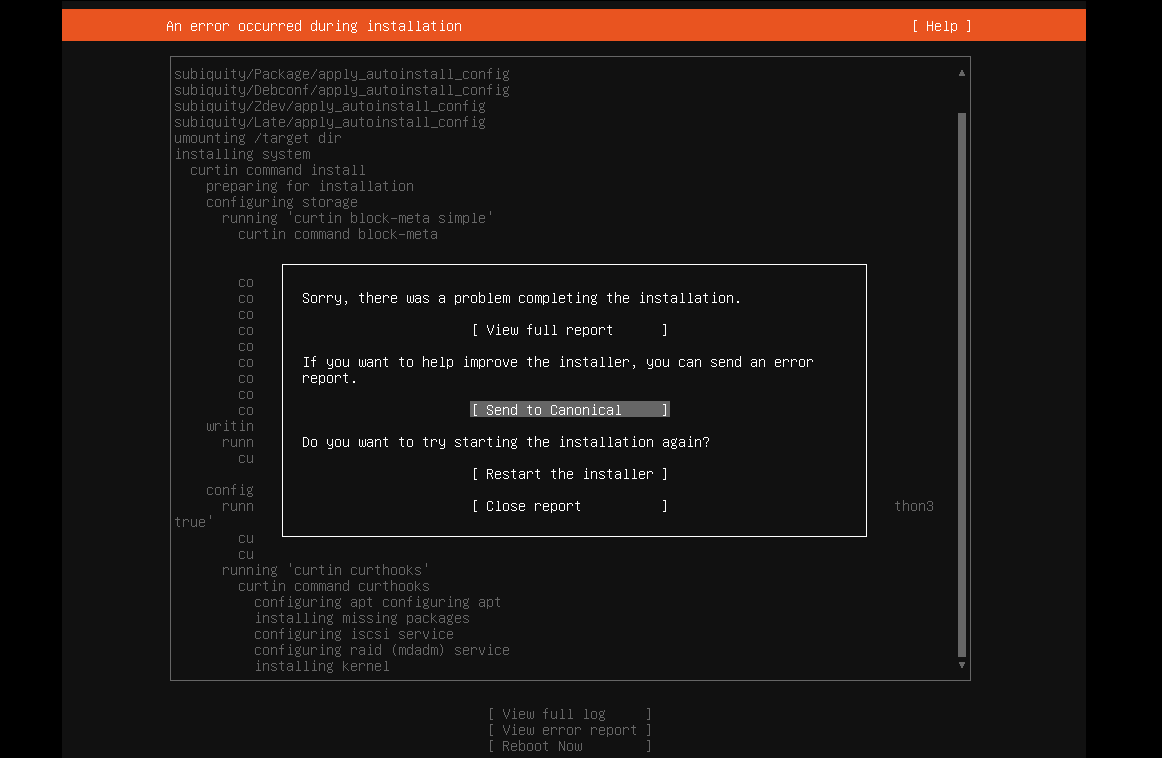
I tried installing Ubuntu 22.04 server on VMware Workstation and got this message: Sorry, there was a problem completing the installation E...
-
I tried installing Ubuntu 22.04 server on VMware Workstation and got this message: Sorry, there was a problem completing the installation E...
-
I was having a problem with audio latency in VMware Workstation on my Windows 10 guest. I found an article that helped me fix it. Ever sin...
-
We have a customer at work that runs Dentrix. They have 4 offices, and need to have all of the patient data in one place. Unfortunately,...
