I am just about finished with my brother's web site, Intermountain Biomedical.
If you've ever seen my business's web site, you'll know instantly where it came from.
Sunday, February 28, 2010

Sunday, December 13, 2009
Exchange Installation Hell
I tried to install Exchange 2003 on a secondary server, and it prompted me for a "user name, domain, and password" for some exchange 5.5 administration account. I thought this was very odd as I had never installed Exchange 5.5 on this network.
Well, the fix was fairly simple, but finding it was a pain in the ass. Adapting the solution given at this page, I was able to fix it by doing this:
1. Open ADSI Edit and expand the "Configuration" node in the left pane.
2. Expand the Configuration Container -> CN=Configuration -> CN=Services -> CN=Microsoft Exchange -> CN=Organization -> CN=Administrative Groups
3. Right click the administrative group in which the affected Exchange 2003 server is a member, and then click Properties.
4. In the Select property to view list, select each of the following attributes:
- msExchLegacyAccount: [I set this to Administrator]
- msExchLegacyDomain: [I set this to the Windows NT domain name I was on]
- msExchLegacyPW: [I set this to the Administrator password]
- msExchEncryptedPassword [I left this unset]
5. Change the value of the msExchAdminGroupMode attribute from 2 to 0 (zero), which indicates a Native Administrative Group. [not sure if this was even necessary]
Then I logged off and on, reran setup, and it worked! I may have had to enter the Administrator password on that screen. I don't remember.
Well, the fix was fairly simple, but finding it was a pain in the ass. Adapting the solution given at this page, I was able to fix it by doing this:
1. Open ADSI Edit and expand the "Configuration" node in the left pane.
2. Expand the Configuration Container -> CN=Configuration -> CN=Services -> CN=Microsoft Exchange -> CN=Organization -> CN=Administrative Groups
3. Right click the administrative group in which the affected Exchange 2003 server is a member, and then click Properties.
4. In the Select property to view list, select each of the following attributes:
- msExchLegacyAccount: [I set this to Administrator]
- msExchLegacyDomain: [I set this to the Windows NT domain name I was on]
- msExchLegacyPW: [I set this to the Administrator password]
- msExchEncryptedPassword [I left this unset]
5. Change the value of the msExchAdminGroupMode attribute from 2 to 0 (zero), which indicates a Native Administrative Group. [not sure if this was even necessary]
Then I logged off and on, reran setup, and it worked! I may have had to enter the Administrator password on that screen. I don't remember.
Wednesday, November 11, 2009
SSLSniff on Ubuntu 9.10 Karmic Koala
I had a tough time compiling this program, but it turns out, all I needed to do was change one line in the Makefile:
sslsniff_LDFLAGS = -lssl -lboost_filesystem -lpthread -lboost_thread -llog4cpp
to
sslsniff_LDFLAGS = -lssl -lboost_filesystem-mt -lpthread -lboost_thread-mt -llog4cpp
This is because the program 'requires' libboost 1.35 and Karmic only allows you to use 1.34 or 1.38. I installed 1.38 by typing 'apt-get install libboost1.38-dev'.
sslsniff_LDFLAGS = -lssl -lboost_filesystem -lpthread -lboost_thread -llog4cpp
to
sslsniff_LDFLAGS = -lssl -lboost_filesystem-mt -lpthread -lboost_thread-mt -llog4cpp
This is because the program 'requires' libboost 1.35 and Karmic only allows you to use 1.34 or 1.38. I installed 1.38 by typing 'apt-get install libboost1.38-dev'.
Sunday, July 26, 2009
New Job + Apartment
I start a new job tomorrow as a level 2 network engineer. I'll be providing phone and email support to various companies who have server troubles.
I've spent the weekend moving into a new apartment that is 10 minutes away from work. It's very nice- I even have my own washer and dryer! I had to take a bath yesterday though because it didn't come with a shower curtain. Bathtubs are not designed for people who are 6 feet tall!
My neighbor has a really fast internet connection- 10Mbps down, 3Mbps up. And now, so do I. :)
I've spent the weekend moving into a new apartment that is 10 minutes away from work. It's very nice- I even have my own washer and dryer! I had to take a bath yesterday though because it didn't come with a shower curtain. Bathtubs are not designed for people who are 6 feet tall!
My neighbor has a really fast internet connection- 10Mbps down, 3Mbps up. And now, so do I. :)
Saturday, June 6, 2009
Bad RAM
I had a Dell Vostro 1720 with bad RAM. It gave me a message when I turned it on that said "resource conflict- allocation error 0x02." Then when Windows XP tried to start it would either bluescreen or say that the file C:\Windows\System32\Config\SYSTEM was corrupted and that I would need to run the repair program on my Windows XP CD.
Fortunately, I was able to run the Dell diagnostics program and it told me that my RAM was bad. But the behavior was peculiar and unexpected- I thought it had a bad hard drive!
Fortunately, I was able to run the Dell diagnostics program and it told me that my RAM was bad. But the behavior was peculiar and unexpected- I thought it had a bad hard drive!
Tuesday, April 28, 2009
Fans
I went to a customer whose computer was "shutting itself off every day at 2:45pm." At first, I thought it was the backup power generator, but they said the monitor and other components stayed on.
After a while, I figured out the solution that should have been obvious: the fan was bad.
After a while, I figured out the solution that should have been obvious: the fan was bad.
Saturday, March 14, 2009
Remote Desktop Trouble
I've been having a problem connecting to Remote Desktop on my main workstation for a long time. The problem started in Windows XP SP2, then I upgraded to SP3 and it worked fine for a while, and then it stopped working again.
The problem was that whenever I tried to connect to it, the Remote Desktop client would immediately disconnect, without any error messages or event log entries.
The cause turned out to be my nVidia drivers:
Though I'd expect this problem to be solved with the latest driver, it seems it's existed atleast since May of 2008 and version 175.16.
The following is a quote from Nvidia's site:
"The root of the problem is that the session image space is too small and it can't load any more drivers into it. The session image space is shared for the display driver drivers and printer drivers. rdpdd = remote desktop protocol display driver.
You can fix this bug by increasing the size of the session image space via a registry key. Add the following key:
[HKEY_LOCAL_MACHINE\SYSTEM\CurrentControlSet\Control\Session Manager\Memory Management]
"SessionImageSize"=dword:00000020
0x20 == 32 MB works on my system anyway."
I added that registry key, rebooted and now it works... I still have no clue why one day it would suddenly stop working but that fixed it and I'm happy with that.
Here is the full forum post
The problem was that whenever I tried to connect to it, the Remote Desktop client would immediately disconnect, without any error messages or event log entries.
The cause turned out to be my nVidia drivers:
Though I'd expect this problem to be solved with the latest driver, it seems it's existed atleast since May of 2008 and version 175.16.
The following is a quote from Nvidia's site:
"The root of the problem is that the session image space is too small and it can't load any more drivers into it. The session image space is shared for the display driver drivers and printer drivers. rdpdd = remote desktop protocol display driver.
You can fix this bug by increasing the size of the session image space via a registry key. Add the following key:
[HKEY_LOCAL_MACHINE\SYSTEM\CurrentControlSet\Control\Session Manager\Memory Management]
"SessionImageSize"=dword:00000020
0x20 == 32 MB works on my system anyway."
I added that registry key, rebooted and now it works... I still have no clue why one day it would suddenly stop working but that fixed it and I'm happy with that.
Here is the full forum post
Subscribe to:
Posts (Atom)
Ubuntu 22.04 on VMware Workstation Error
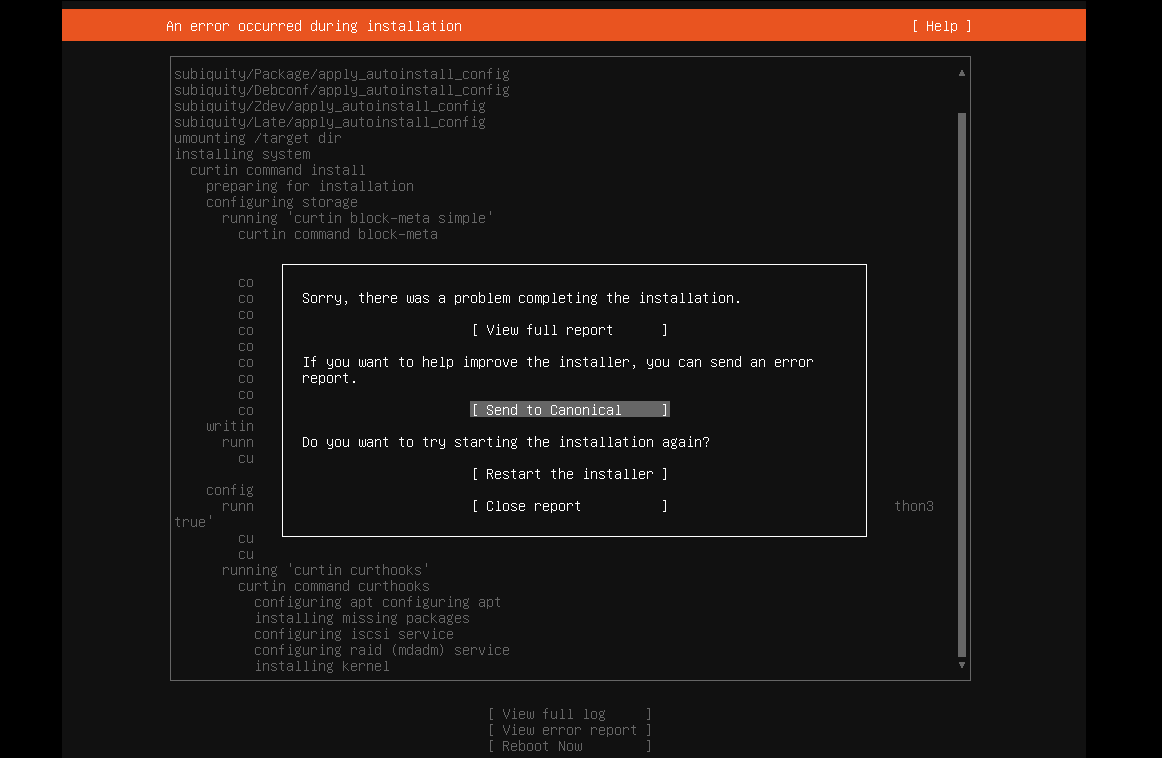
I tried installing Ubuntu 22.04 server on VMware Workstation and got this message: Sorry, there was a problem completing the installation E...
-
We have a customer at work that runs Dentrix. They have 4 offices, and need to have all of the patient data in one place. Unfortunately,...
-
I tried installing Ubuntu 22.04 server on VMware Workstation and got this message: Sorry, there was a problem completing the installation E...
-
I finally got my first complaint from the MPAA! Here it is, in its full glory! Dear Subscriber: This email is being sent to you by Road...
