Wow, I can't believe it's been over a year since my last post.
I've been trying to figure out to do with three of my computers. Currently, I have a Sempron 3300+ with 512MB of RAM that I use to watch videos on my TV. Since I use my Xbox for that now, I've been thinking about repurposing it, but my Xbox doesn't play HD video, so I'm not sure I want to get rid of it just yet. That being said, most of my video is not HD, and I hardly ever use it. So I don't know...
I also have a Pentium 4 1.7Ghz with 1GB of RAM that I installed Fedora 14 on. I could use it as an Apache server, but I already have a web hosting account with Godaddy. Perhaps I could put some kind of web app on it or use it for testing. I also could use it as an rsnapshot server to make backups, but there isn't really a whole lot I need to back up.
My third computer is a Celeron 1.4GHz with 256MB of RAM. Yep, it's junk and I should get rid of it. It's fast enough to run Ubuntu server though, so I could do that. I've been thinking about giving it to my brother for that purpose, but he said he wasn't interested. I could also just scrap it and make use of the Windows XP Professional license and the 20GB hard drive.
Who knows what I'll do.
Sunday, March 13, 2011

Sunday, February 28, 2010
Intermountain Biomedical
I am just about finished with my brother's web site, Intermountain Biomedical.
If you've ever seen my business's web site, you'll know instantly where it came from.
If you've ever seen my business's web site, you'll know instantly where it came from.
Sunday, December 13, 2009
Exchange Installation Hell
I tried to install Exchange 2003 on a secondary server, and it prompted me for a "user name, domain, and password" for some exchange 5.5 administration account. I thought this was very odd as I had never installed Exchange 5.5 on this network.
Well, the fix was fairly simple, but finding it was a pain in the ass. Adapting the solution given at this page, I was able to fix it by doing this:
1. Open ADSI Edit and expand the "Configuration" node in the left pane.
2. Expand the Configuration Container -> CN=Configuration -> CN=Services -> CN=Microsoft Exchange -> CN=Organization -> CN=Administrative Groups
3. Right click the administrative group in which the affected Exchange 2003 server is a member, and then click Properties.
4. In the Select property to view list, select each of the following attributes:
- msExchLegacyAccount: [I set this to Administrator]
- msExchLegacyDomain: [I set this to the Windows NT domain name I was on]
- msExchLegacyPW: [I set this to the Administrator password]
- msExchEncryptedPassword [I left this unset]
5. Change the value of the msExchAdminGroupMode attribute from 2 to 0 (zero), which indicates a Native Administrative Group. [not sure if this was even necessary]
Then I logged off and on, reran setup, and it worked! I may have had to enter the Administrator password on that screen. I don't remember.
Well, the fix was fairly simple, but finding it was a pain in the ass. Adapting the solution given at this page, I was able to fix it by doing this:
1. Open ADSI Edit and expand the "Configuration" node in the left pane.
2. Expand the Configuration Container -> CN=Configuration -> CN=Services -> CN=Microsoft Exchange -> CN=Organization -> CN=Administrative Groups
3. Right click the administrative group in which the affected Exchange 2003 server is a member, and then click Properties.
4. In the Select property to view list, select each of the following attributes:
- msExchLegacyAccount: [I set this to Administrator]
- msExchLegacyDomain: [I set this to the Windows NT domain name I was on]
- msExchLegacyPW: [I set this to the Administrator password]
- msExchEncryptedPassword [I left this unset]
5. Change the value of the msExchAdminGroupMode attribute from 2 to 0 (zero), which indicates a Native Administrative Group. [not sure if this was even necessary]
Then I logged off and on, reran setup, and it worked! I may have had to enter the Administrator password on that screen. I don't remember.
Wednesday, November 11, 2009
SSLSniff on Ubuntu 9.10 Karmic Koala
I had a tough time compiling this program, but it turns out, all I needed to do was change one line in the Makefile:
sslsniff_LDFLAGS = -lssl -lboost_filesystem -lpthread -lboost_thread -llog4cpp
to
sslsniff_LDFLAGS = -lssl -lboost_filesystem-mt -lpthread -lboost_thread-mt -llog4cpp
This is because the program 'requires' libboost 1.35 and Karmic only allows you to use 1.34 or 1.38. I installed 1.38 by typing 'apt-get install libboost1.38-dev'.
sslsniff_LDFLAGS = -lssl -lboost_filesystem -lpthread -lboost_thread -llog4cpp
to
sslsniff_LDFLAGS = -lssl -lboost_filesystem-mt -lpthread -lboost_thread-mt -llog4cpp
This is because the program 'requires' libboost 1.35 and Karmic only allows you to use 1.34 or 1.38. I installed 1.38 by typing 'apt-get install libboost1.38-dev'.
Sunday, July 26, 2009
New Job + Apartment
I start a new job tomorrow as a level 2 network engineer. I'll be providing phone and email support to various companies who have server troubles.
I've spent the weekend moving into a new apartment that is 10 minutes away from work. It's very nice- I even have my own washer and dryer! I had to take a bath yesterday though because it didn't come with a shower curtain. Bathtubs are not designed for people who are 6 feet tall!
My neighbor has a really fast internet connection- 10Mbps down, 3Mbps up. And now, so do I. :)
I've spent the weekend moving into a new apartment that is 10 minutes away from work. It's very nice- I even have my own washer and dryer! I had to take a bath yesterday though because it didn't come with a shower curtain. Bathtubs are not designed for people who are 6 feet tall!
My neighbor has a really fast internet connection- 10Mbps down, 3Mbps up. And now, so do I. :)
Saturday, June 6, 2009
Bad RAM
I had a Dell Vostro 1720 with bad RAM. It gave me a message when I turned it on that said "resource conflict- allocation error 0x02." Then when Windows XP tried to start it would either bluescreen or say that the file C:\Windows\System32\Config\SYSTEM was corrupted and that I would need to run the repair program on my Windows XP CD.
Fortunately, I was able to run the Dell diagnostics program and it told me that my RAM was bad. But the behavior was peculiar and unexpected- I thought it had a bad hard drive!
Fortunately, I was able to run the Dell diagnostics program and it told me that my RAM was bad. But the behavior was peculiar and unexpected- I thought it had a bad hard drive!
Tuesday, April 28, 2009
Fans
I went to a customer whose computer was "shutting itself off every day at 2:45pm." At first, I thought it was the backup power generator, but they said the monitor and other components stayed on.
After a while, I figured out the solution that should have been obvious: the fan was bad.
After a while, I figured out the solution that should have been obvious: the fan was bad.
Subscribe to:
Posts (Atom)
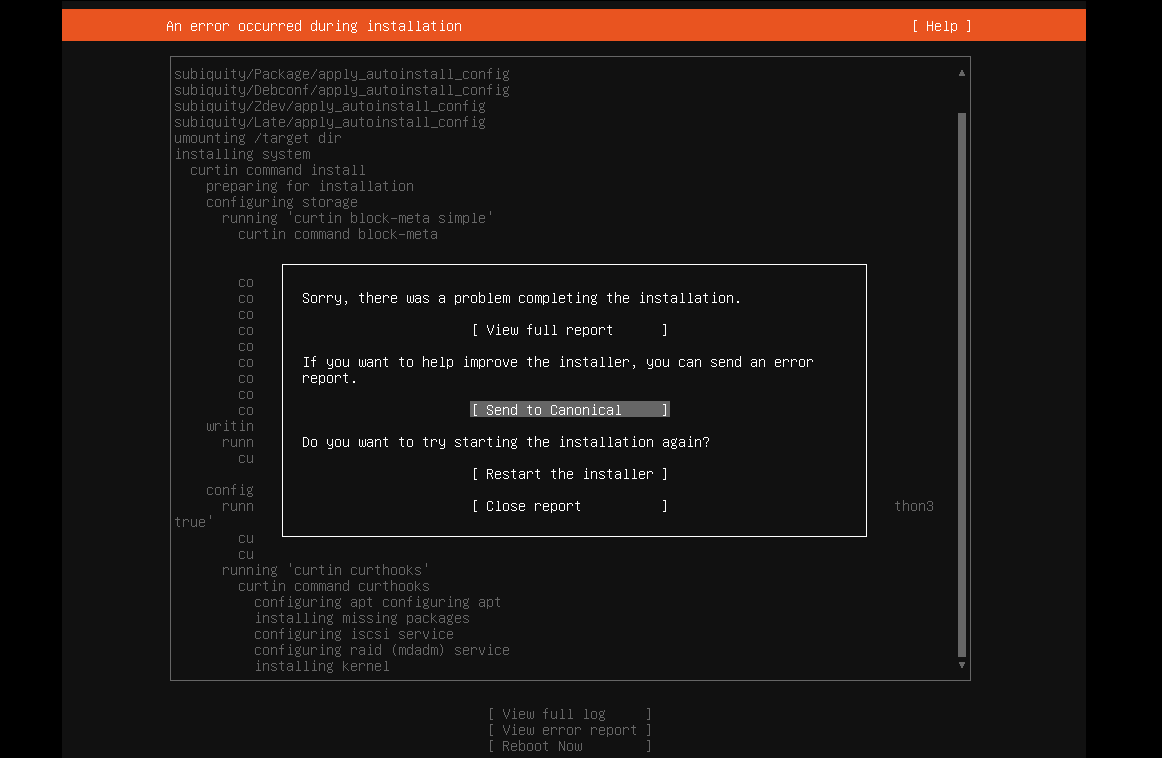
Ubuntu 22.04 on VMware Workstation Error
I tried installing Ubuntu 22.04 server on VMware Workstation and got this message: Sorry, there was a problem completing the installation E...
-
I tried installing Ubuntu 22.04 server on VMware Workstation and got this message: Sorry, there was a problem completing the installation E...
-
I was having a problem with audio latency in VMware Workstation on my Windows 10 guest. I found an article that helped me fix it. Ever sin...
-
We have a customer at work that runs Dentrix. They have 4 offices, and need to have all of the patient data in one place. Unfortunately,...
