Friday, April 2, 2021

Virtualbox Crashing when pulling up the Optical Drives Menu

 I'm still running an old version of Virtualbox (5.2.20), which is probably unsupported at this point.  One day, it started crashing whenever I had a VM open and went to Devices, Optical Drives.

The problem was that one of the ISOs I had mounted previously was on a network file server that didn't exist anymore.  I tried editing various VBox XML files, but they kept refreshing and including the old ISO file.

What I ended up doing was I temporarily changed another file server's IP to that of the old file server and I put an ISO file with the same name in the previous location.  Virtualbox seemed happy with this.  However, I wasn't able to find a good way to clear the recent ISO files list, so I tried the brute-force method: I mounted several other ISOs until it dropped off the list of recent ISO files.

After changing my file server's IP back, everything worked fine again.

I figured this out by using Process Monitor to figure out what the Virtualbox process was accessing.  When I saw it trying to pull up network paths, I ran Wireshark to see what was happening when it tried to access the server that wasn't there anymore.

Monday, October 14, 2019

The Tech Industry

I’m not sure I quite know how to put into words how I feel about the tech industry lately.  I used to always want the latest gear, and be constantly on the hunt for new hardware that would make my games run faster and look better.  Now it seems, everything has just stagnated.

In 1997, I bought a $500 scanner – considered low-cost at the time.  I bought it because my friend’s dad had one and I thought it would be cool to be able to scan documents and photos.  But I didn’t take very many pictures or have all that much to scan.  This turned out to be my first major purchase that was a total flop, and I started being much more careful about how I spent my money from then on.

I think the real change came around 2005 though.  That was the year that DirectX 9 games came out – Half-Life 2, Quake 4, etc.  Those were really the last new games that I would play until about 2012.  I spent a lot of time playing CS:Source, but a lot less time playing video games in general.

Graphics also began to stagnate, and a lot of that was because of the Xbox 360 and PlayStation 3 being around for so long.  It wasn’t until the upgraded versions of those consoles came out that there were real improvements.  Not that it really mattered, because by 2004, it seemed like things were just “good enough.”

A lot had changed in my life by then besides gaming too.  I had gone through college and started working, so I had less time and other priorities.  It seems like I have lost a lot of my creativity too.  But now it seems like software is something that you rent.  You’ll never get to play your old games after a few years, and definitely not in their original form, before they were broken with a bunch of patches.

Friday, April 12, 2019

Kaspersky

Exclusive: How a Russian firm helped catch an alleged NSA data thief

https://www.politico.com/story/2019/01/09/russia-kaspersky-lab-nsa-cybersecurity-1089131

Highlights

The 2016 arrest of a former National Security Agency contractor charged with a massive theft of classified data began with an unlikely source: a tip from a Russian cybersecurity firm that the U.S. government has called a threat to the country.

Moscow-based Kaspersky Lab turned Harold T. Martin III in to the NSA after receiving strange Twitter messages in 2016 from an account linked to him, according to two people with knowledge of the investigation. They spoke with POLITICO on condition of anonymity because they’re not authorized to discuss the case.
-----
Although Kaspersky has worked with U.S. law enforcement and security firms for years to track hackers, the company's relationship with the government began to grow tense around 2012 as it exposed a series of covert NSA spy kits and hacking operations after finding the previously unknown spy software on customers’ machines. The company has exposed more U.S. spy operations than any other cybersecurity firm in the last six years, and has in turn become a hacking target of spy agencies itself for its success in exposing not only NSA operations but those of Israel, the United Kingdom and France.
-----
But the collection of files helped fuel U.S. allegations that Kaspersky itself poses a security threat. That’s because, unknown to Kaspersky at the time, Israel had hacked the company’s network in 2014, and in 2015 quietly told U.S. officials that it saw Russian intelligence operatives siphon the tools from Pho's machine with Kaspersky's cooperation or knowledge, using its antivirus software. The public only learned about this allegation in 2017 when anonymous sources leaked it to reporters. But no evidence backing this claim has ever been made public, and nobody has explained how the Israelis knew the extraction was not just part of standard infection analysis and cleanup.
-----
[Regarding Harold Martin's Twitter account]
The Kaspersky researcher didn't respond to the Twitter sender after this. Instead, he and colleagues conducted some online sleuthing and were able to easily unmask the sender's identity.

A Google search on the Twitter handle found someone using the same Hal999999999 username on a personal ad seeking female sex partners...A different search led them to a LinkedIn profile for Hal Martin, described as a researcher in Annapolis Junction and "technical advisor and investigator on offensive cyber issues." The LinkedIn profile didn't mention the NSA, but said Martin worked as a consultant or contractor “for various cyber related initiatives” across the Defense Department and intelligence community.

Friday, September 7, 2018

Guide to using GPS with Airodump CSV Tools

There is an Android app included that will capture GPS coordinates from your Android device and save them to a file. Airodump CSV Tools will read this file to determine the GPS coordinates for the APs end devices in your airodump .csv file(s). Run it before you run airodump-ng and stop it after you stop airodump-ng for best results.

To improve its accuracy, you can run this program frequently while you run Airodump (tracker.sh does this once every five seconds). Doing so will keep the list of maximum power levels for each AP and end device in the files [prefix]-appower.csv and [prefix]-stapower.csv. After doing this, copy the GPS file from your Android device and run csvtools again, with the same -w [prefix] and csv file name, and specify the GPS file with -g.

GPS Example:
  1.     Start the GPS app on your phone.
  2.     Enter this in terminal 1: airodump-ng mon0 --output-format=csv -w packets
  3.     Enter this in terminal 2: ./tracker.sh
  4.     Drive around and find some APs
  5.     Stop the apps in terminal 1 and 2.
  6.     Stop the Android app.
  7.     Copy the GPS file from your phone to your computer.
  8.     Run this: csvtools -w test -g [gpsfile] packets-01.csv
  9.     This will generate test.kml, which can be opened in Google Earth.

Airodump CSV Tools v0.6 Released

After more than two years, I have released a new version of Airodump CSV tools.  It features many bug fixes, speed improvements, and a couple of new options.

Now on Github.

Wednesday, February 14, 2018

Crackling sound in Virtualbox

I had a problem with crackling sound after upgrading Virtualbox to v5.2, similar to the bug report filed here.  I found a forum post where one of the developers suggested upgrading to the latest test build, which did not work.  In fact, it made Youtube videos unwatchable and slow, so it made things worse.

Combing through more forums, I found an old solution which worked.  I had my CPU usage throttled to 90%.  The article suggested raising this to 100%, which resolved the issue.

I scaled down the number of cores I was using to prevent the VM from consuming all of my CPU resources.  Also of note is that I am still using the test version.  Host is running Windows 10 1709, and the guest was running Windows 7.

Monday, January 22, 2018

SSL Wrapper Tutorial


SSL Wrapper, found at http://cesanta.com/products.html, allows you to tunnel any TCP connection between two hosts using SSL.  However, the documentation for it is practically nonexistant.
To hopefully save you some time, I have implemented and tested it myself and will now share my notes with you.

Generating SSL Certificates

First, you need to set up your own CA using OpenSSL.  Then you need to generate two certificate/key pairs and get them signed by your CA.
#Generate a 2048-bit RSA private key for the CA:

openssl genrsa -des3 -out ca/ca.key 2048

#Generate the server certificate

openssl req -new -newkey rsa:2048 -nodes -keyout server.key -out server.csr -days 365

openssl x509 -req -days 365 -in server.csr -CA ca.pem -CAkey ca.pem -CAcreateserial -out server.crt

#Generate the client certificate

openssl req -new -newkey rsa:2048 -nodes -keyout chris.key -out chris.csr -days 365

openssl x509 -req -days 365 -in chris.csr -CA ca.pem -CAkey ca.pem -CAcreateserial -out chris.crt

Run the program

Server-side: HTTP server is running at 192.168.1.1, SSL wrapper will listen on port 443
(Using sudo to listen on privileged port 443)
sudo ./ssl_wrapper ssl://443:server.pem:ca.crt tcp://192.168.1.1:80
Client-side: Will listen on port 8080 for HTTP connections, will connect to the SSL Wrapper server at 192.168.100.24:443
./ssl_wrapper tcp://8080 ssl://192.168.100.24:443:chris.pem

MITM Attack

A correctly configured SSL Wrapper will not allow a connection if it is under a MITM attack.  (Using Cain in this example)


Google Chrome will display the message “localhost didn’t send any data” during an MITM attack.

MITM attack possible using incorrect configuration

If it is not configured correctly (not using a CA with client certificate), an MITM attack is possible.

Server-side: HTTP server is running at 192.168.1.1, SSL wrapper will listen on port 443
(Using sudo to listen on privileged port 443)
sudo ./ssl_wrapper ssl://443:server.pem tcp://192.168.1.1:80
Client-side: Will listen on port 8080 for HTTP connections, will connect to the SSL Wrapper server at 192.168.100.24:443
./ssl_wrapper tcp://8080 ssl://192.168.100.24:443


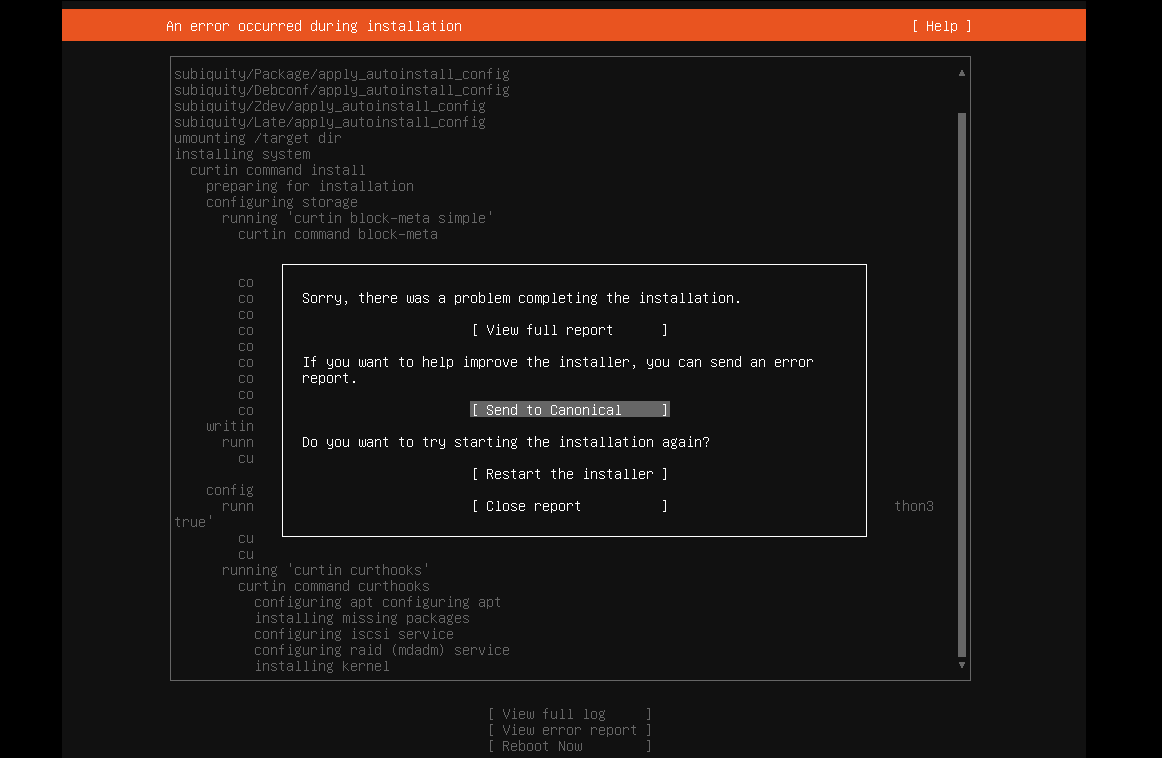
Ubuntu 22.04 on VMware Workstation Error

 I tried installing Ubuntu 22.04 server on VMware Workstation and got this message: Sorry, there was a problem completing the installation E...