Sunday, October 29, 2023

Ubuntu 22.04 on VMware Workstation Error

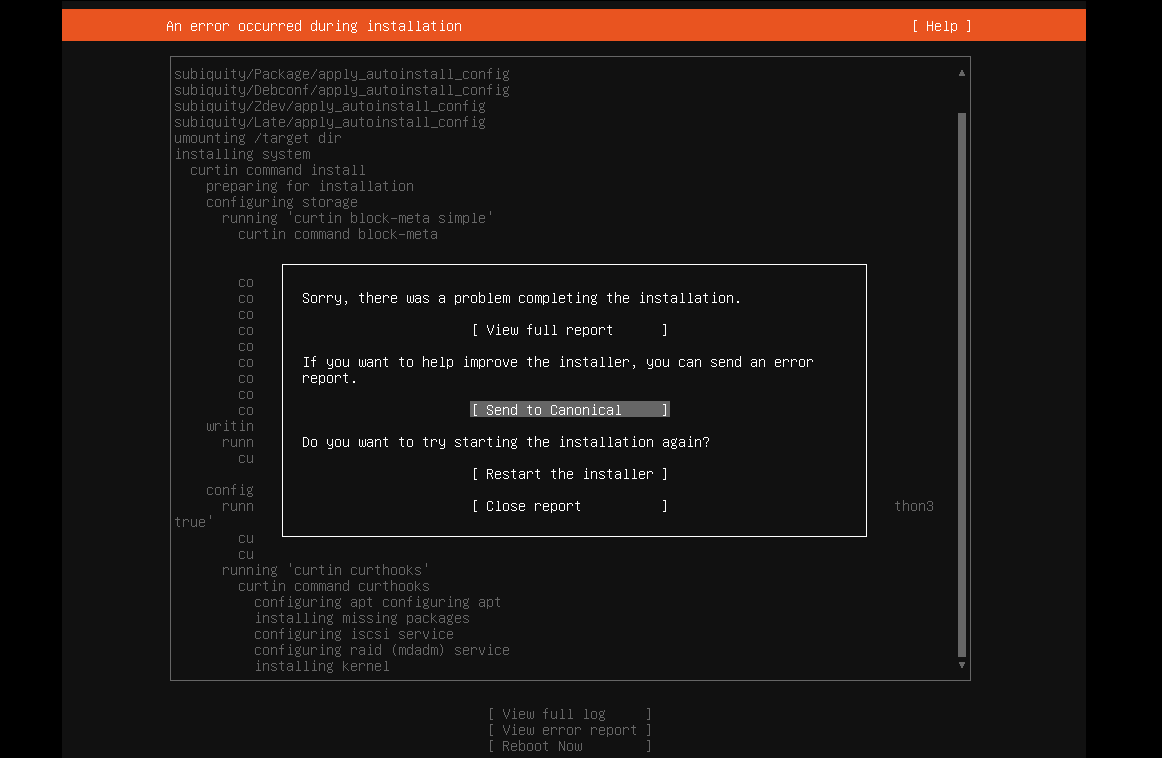
 I tried installing Ubuntu 22.04 server on VMware Workstation and got this message:

Sorry, there was a problem completing the installation

Ended up needing to increase the RAM from 1GB to 4GB to get it to install.  Once it was installed, I was able to bump it back down to 1GB.


Sunday, February 20, 2022

VMware Audio Latency

 I was having a problem with audio latency in VMware Workstation on my Windows 10 guest.  I found an article that helped me fix it.

Ever since I changed to using Windows 10 in my VMware Fusion virtual machine, I've struggled with a fair bit of latency and audio problems when using the standard HDAudio device. Changing the buffer time didn't make a huge difference, but now I've found a way to install the VMaudio driver and revert to the old es1371 audio device so I can lower the latency. This makes my Windows 10 run like my Windows 7 VM latency-wise, and I figured everyone else could use this info, so here goes (note: This worked for me, but I'm not responsible if your audio breaks):
NB: Whenever something is between quotes, assume that everything between the quotes has to be copied or executed. If there are quotes within the quotes, you do have to include those when you copy the text.
1. While it's shut down and VMware fusion is closed, back up your virtual machine by storing a copy of your .vmwarevm package somewhere else, just in case you need to revert later.
2. Boot up your virtual machine.
3. Go to the menu bar > Virtual Machine >Reinstall VMware Tools, and dismiss the auto-play notification or the setup dialog if they appear.
4. Open up a command prompt (windows key+r, then type "cmd")
5. I like to type "D:" to get to my cd-drive, but you can also type the path directly. Run this command on the drive your VMware tools install is mounted:
"setup64 /a"
press enter.
6. Follow the instructions on screen, and extract to a folder of your choosing.
7. Using Windows explorer, go to the directory where you extracted the VMware tools. Within this directory navigate to the following path:
"VMware\VMware Tools\VMware\Drivers\audio\Vista"
8. Locate the file "vmaudio.inf", and press shift+f10 (or right click) on it.
9. Find "install" in the context menu, and press enter on it. Follow the on screen instructions.
10. Shut down your virtual machine and quit VMware fusion. Now it's time to edit your .vmx file
11. In the mac finder, locate your .vmwarevm package, and bring up the context menu. Navigate to "show package contents".
12. Locate your "<name of virtual machine>.vmx" file.
13. Bring up the context menu, find "open with" and open it in your favorite text editor. Text edit will do.
14. You have to change 2 lines in this file. If the line "sound.virtualDev = "hdaudio"" is present, change it to "sound.virtualDev = "es1371""
Next, add this line if it is not already present, and experiment with the buffer length. I find that 30 is a good number: pciSound.playBuffer = "30""
Finally, if you already tweaked the sound.bufferTime parameter with the new hdaudio device, I'm not sure it makes a difference or not. You can possibly leave it there, but I deleted it. Then save your .vmx-file
15. Go into fusion, and boot your machine. Hopefully it should now be much more responsive.

https://www.applevis.com/guides/fixing-vmware-fusion-audio-latency-problems-windows-10

Accessed 2022-02-19

Friday, September 10, 2021

We Need to Teach Critical Thinking Again

One thing most people don’t realize about tech people that are roughly my age (plus or minus five years, let’s say) is how many of the dark corners of the internet we’ve been exposed to.  From 4chan to torrent sites, we’ve had access to content that most people don’t even know exists, and we’ve had this access a lot longer than they have even had the opportunity.

Back when TiVo was new and most people watched broadcast TV according to a schedule, we were recording and uploading our shows to the internet, region controls be damned.  Occasionally, I’d log into a torrent site and see some crazy conspiracy video about how we didn’t really land on the moon, or that the Jews did 9/11.  Now, people are all concerned that content like this is poisoning people’s minds.  Well, that’s because most people today have zero critical thinking skills and their opinions are assigned to them.  So if they watch a conspiracy video, they just automatically believe or reject it.  Maybe some parts of the video are legitimate, but oftentimes, there are many untruths, be they lies or simply someone who was misinformed.

The last few years have made me aware of just how easy it is to manipulate people, and it is truly frustrating to see it in action.  But that’s what happens when you have a public education system.  The state doesn’t teach you things that the state doesn’t want you to know, like your rights, or how to be fiscally responsible, or how to recognize when you’re being lied to.  It’s not going to change until people unplug and start reading books.  Most people won’t ever be able to think for themselves, and that’s by design.

We need some kind of school choice, and with technology today, that should be easier than ever.  State education controls require students to be able to pass standardized tests, and that is where our public schools curricula originate.  We can make videos on the same topics that get taught over and over again, but we also need to inspire a sense of curiosity in our kids so that they will seek out new knowledge that isn’t spoon-fed to them.  I don’t know how to get most people to do this, though, because they seem completely uninterested in doing so.

Friday, April 2, 2021

Virtualbox Crashing when pulling up the Optical Drives Menu

 I'm still running an old version of Virtualbox (5.2.20), which is probably unsupported at this point.  One day, it started crashing whenever I had a VM open and went to Devices, Optical Drives.

The problem was that one of the ISOs I had mounted previously was on a network file server that didn't exist anymore.  I tried editing various VBox XML files, but they kept refreshing and including the old ISO file.

What I ended up doing was I temporarily changed another file server's IP to that of the old file server and I put an ISO file with the same name in the previous location.  Virtualbox seemed happy with this.  However, I wasn't able to find a good way to clear the recent ISO files list, so I tried the brute-force method: I mounted several other ISOs until it dropped off the list of recent ISO files.

After changing my file server's IP back, everything worked fine again.

I figured this out by using Process Monitor to figure out what the Virtualbox process was accessing.  When I saw it trying to pull up network paths, I ran Wireshark to see what was happening when it tried to access the server that wasn't there anymore.

Monday, October 14, 2019

The Tech Industry

I’m not sure I quite know how to put into words how I feel about the tech industry lately.  I used to always want the latest gear, and be constantly on the hunt for new hardware that would make my games run faster and look better.  Now it seems, everything has just stagnated.

In 1997, I bought a $500 scanner – considered low-cost at the time.  I bought it because my friend’s dad had one and I thought it would be cool to be able to scan documents and photos.  But I didn’t take very many pictures or have all that much to scan.  This turned out to be my first major purchase that was a total flop, and I started being much more careful about how I spent my money from then on.

I think the real change came around 2005 though.  That was the year that DirectX 9 games came out – Half-Life 2, Quake 4, etc.  Those were really the last new games that I would play until about 2012.  I spent a lot of time playing CS:Source, but a lot less time playing video games in general.

Graphics also began to stagnate, and a lot of that was because of the Xbox 360 and PlayStation 3 being around for so long.  It wasn’t until the upgraded versions of those consoles came out that there were real improvements.  Not that it really mattered, because by 2004, it seemed like things were just “good enough.”

A lot had changed in my life by then besides gaming too.  I had gone through college and started working, so I had less time and other priorities.  It seems like I have lost a lot of my creativity too.  But now it seems like software is something that you rent.  You’ll never get to play your old games after a few years, and definitely not in their original form, before they were broken with a bunch of patches.

Friday, April 12, 2019

Kaspersky

Exclusive: How a Russian firm helped catch an alleged NSA data thief

https://www.politico.com/story/2019/01/09/russia-kaspersky-lab-nsa-cybersecurity-1089131

Highlights

The 2016 arrest of a former National Security Agency contractor charged with a massive theft of classified data began with an unlikely source: a tip from a Russian cybersecurity firm that the U.S. government has called a threat to the country.

Moscow-based Kaspersky Lab turned Harold T. Martin III in to the NSA after receiving strange Twitter messages in 2016 from an account linked to him, according to two people with knowledge of the investigation. They spoke with POLITICO on condition of anonymity because they’re not authorized to discuss the case.
-----
Although Kaspersky has worked with U.S. law enforcement and security firms for years to track hackers, the company's relationship with the government began to grow tense around 2012 as it exposed a series of covert NSA spy kits and hacking operations after finding the previously unknown spy software on customers’ machines. The company has exposed more U.S. spy operations than any other cybersecurity firm in the last six years, and has in turn become a hacking target of spy agencies itself for its success in exposing not only NSA operations but those of Israel, the United Kingdom and France.
-----
But the collection of files helped fuel U.S. allegations that Kaspersky itself poses a security threat. That’s because, unknown to Kaspersky at the time, Israel had hacked the company’s network in 2014, and in 2015 quietly told U.S. officials that it saw Russian intelligence operatives siphon the tools from Pho's machine with Kaspersky's cooperation or knowledge, using its antivirus software. The public only learned about this allegation in 2017 when anonymous sources leaked it to reporters. But no evidence backing this claim has ever been made public, and nobody has explained how the Israelis knew the extraction was not just part of standard infection analysis and cleanup.
-----
[Regarding Harold Martin's Twitter account]
The Kaspersky researcher didn't respond to the Twitter sender after this. Instead, he and colleagues conducted some online sleuthing and were able to easily unmask the sender's identity.

A Google search on the Twitter handle found someone using the same Hal999999999 username on a personal ad seeking female sex partners...A different search led them to a LinkedIn profile for Hal Martin, described as a researcher in Annapolis Junction and "technical advisor and investigator on offensive cyber issues." The LinkedIn profile didn't mention the NSA, but said Martin worked as a consultant or contractor “for various cyber related initiatives” across the Defense Department and intelligence community.

Friday, September 7, 2018

Guide to using GPS with Airodump CSV Tools

There is an Android app included that will capture GPS coordinates from your Android device and save them to a file. Airodump CSV Tools will read this file to determine the GPS coordinates for the APs end devices in your airodump .csv file(s). Run it before you run airodump-ng and stop it after you stop airodump-ng for best results.

To improve its accuracy, you can run this program frequently while you run Airodump (tracker.sh does this once every five seconds). Doing so will keep the list of maximum power levels for each AP and end device in the files [prefix]-appower.csv and [prefix]-stapower.csv. After doing this, copy the GPS file from your Android device and run csvtools again, with the same -w [prefix] and csv file name, and specify the GPS file with -g.

GPS Example:
  1.     Start the GPS app on your phone.
  2.     Enter this in terminal 1: airodump-ng mon0 --output-format=csv -w packets
  3.     Enter this in terminal 2: ./tracker.sh
  4.     Drive around and find some APs
  5.     Stop the apps in terminal 1 and 2.
  6.     Stop the Android app.
  7.     Copy the GPS file from your phone to your computer.
  8.     Run this: csvtools -w test -g [gpsfile] packets-01.csv
  9.     This will generate test.kml, which can be opened in Google Earth.

Airodump CSV Tools v0.6 Released

After more than two years, I have released a new version of Airodump CSV tools.  It features many bug fixes, speed improvements, and a couple of new options.

Now on Github.

Wednesday, February 14, 2018

Crackling sound in Virtualbox

I had a problem with crackling sound after upgrading Virtualbox to v5.2, similar to the bug report filed here.  I found a forum post where one of the developers suggested upgrading to the latest test build, which did not work.  In fact, it made Youtube videos unwatchable and slow, so it made things worse.

Combing through more forums, I found an old solution which worked.  I had my CPU usage throttled to 90%.  The article suggested raising this to 100%, which resolved the issue.

I scaled down the number of cores I was using to prevent the VM from consuming all of my CPU resources.  Also of note is that I am still using the test version.  Host is running Windows 10 1709, and the guest was running Windows 7.

Monday, January 22, 2018

SSL Wrapper Tutorial


SSL Wrapper, found at http://cesanta.com/products.html, allows you to tunnel any TCP connection between two hosts using SSL.  However, the documentation for it is practically nonexistant.
To hopefully save you some time, I have implemented and tested it myself and will now share my notes with you.

Generating SSL Certificates

First, you need to set up your own CA using OpenSSL.  Then you need to generate two certificate/key pairs and get them signed by your CA.
#Generate a 2048-bit RSA private key for the CA:

openssl genrsa -des3 -out ca/ca.key 2048

#Generate the server certificate

openssl req -new -newkey rsa:2048 -nodes -keyout server.key -out server.csr -days 365

openssl x509 -req -days 365 -in server.csr -CA ca.pem -CAkey ca.pem -CAcreateserial -out server.crt

#Generate the client certificate

openssl req -new -newkey rsa:2048 -nodes -keyout chris.key -out chris.csr -days 365

openssl x509 -req -days 365 -in chris.csr -CA ca.pem -CAkey ca.pem -CAcreateserial -out chris.crt

Run the program

Server-side: HTTP server is running at 192.168.1.1, SSL wrapper will listen on port 443
(Using sudo to listen on privileged port 443)
sudo ./ssl_wrapper ssl://443:server.pem:ca.crt tcp://192.168.1.1:80
Client-side: Will listen on port 8080 for HTTP connections, will connect to the SSL Wrapper server at 192.168.100.24:443
./ssl_wrapper tcp://8080 ssl://192.168.100.24:443:chris.pem

MITM Attack

A correctly configured SSL Wrapper will not allow a connection if it is under a MITM attack.  (Using Cain in this example)


Google Chrome will display the message “localhost didn’t send any data” during an MITM attack.

MITM attack possible using incorrect configuration

If it is not configured correctly (not using a CA with client certificate), an MITM attack is possible.

Server-side: HTTP server is running at 192.168.1.1, SSL wrapper will listen on port 443
(Using sudo to listen on privileged port 443)
sudo ./ssl_wrapper ssl://443:server.pem tcp://192.168.1.1:80
Client-side: Will listen on port 8080 for HTTP connections, will connect to the SSL Wrapper server at 192.168.100.24:443
./ssl_wrapper tcp://8080 ssl://192.168.100.24:443


Monday, August 7, 2017

Windows 10 Explorer Shell Crash

I had some issues after installing Windows Updates in 1607 for June 2017.  My Explorer shell crashed constantly, and I had to go into Task Manager and restart it 3-4 times per day.

After using Process Monitor and looking at the event log, I was able to narrow it down to Microsoft Office.  I had Office 2016 installed, but also Visio 2013.  I uninstalled Visio 2013, ran a repair install of Office, and upgraded to Visio 2016.  I haven't had a problem with it since.

It looks like Windows Update was trying to upgrade Visio 2013, but the install was either corrupted or conflicting with my Office 2016 install.

Friday, July 21, 2017

Facebook Shadow Profiles

Facebook has tons of info on people who never made an account on it, it's called shadow profile and it's all thanks to stupid friends.

FB collects phone numbers from phones of people who download their shitty apps and cross-references them with their database of phone numbers. Phil has a number 123-456 in his phone address book assigned to Frank Walcott. Mary has number 123-456 in her phone address book assigned to Frank Walcott.

Also, Phil and Mary have each other's phone numbers, so FB can with 99.99% certainty know Frank Walcott's phone number, even though the guy might have never made an FB account and thinks he's safe and anonymous. The same process can be applied to names of WiFi networks, for example. In fact, just having the ability to know the names of available WiFi addresses precisely pinpoints the user geographically.

FB collects so much data, it boggles the mind. Downloading any of their apps is like putting the phone through a data juicer, it just collects everything.


Source

Tuesday, April 25, 2017

No mouse cursor in games

Here's a simple fix.  I would launch games in full-screen mode and my mouse cursor would disappear.  Internet articles said it was related to mouse pointer trails being enabled (they weren't).  In my case, though, I fixed it by closing the Magnifier application.

Wednesday, December 14, 2016

Putty crashing on Windows 10

Using a dynamic proxy in Putty, I was encountering an issue where Putty would crash in Windows 10.  I got an error in the Application event log:
Faulting application name: putty.exe, version: 0.63.0.0, time stamp: 0x52012e86
Faulting module name: putty.exe, version: 0.63.0.0, time stamp: 0x52012e86
Exception code: 0xc0000005
Fault offset: 0x0001846e
Faulting process id: 0x3f4
[snipped]

Also looking at the System event log, I saw a lot of these (Event ID 140, Source NTFS):
The system failed to flush data to the transaction log. Corruption may occur in VolumeId: ??, DeviceName: \Device\ImDisk0.
(The device has been removed.)

This turned out to be an issue with Veracrypt.  I had the entire system drive encrypted.  After decrypting it, the errors are gone and everything is working again (for now).  Also, the system is running on VMware ESXi 6.0.

Wednesday, September 14, 2016

dllhost.exe - High CPU Usage

I was getting high CPU usage from dllhost.exe recently.  I noticed it when my laptop's battery started draining unusually quickly.  After trying several things, I logged on as a different user, and the problem went away.  So I backed up my documents and settings, blew away my profile, and logged back in.  Problem solved.

Or so I thought.  After restoring all of my documents, the problem came back.

I discovered it was Windows, trying to index a corrupted video file that was on my desktop.  I deleted the corrupted video file, and my CPU usage returned to normal.

Wednesday, August 17, 2016

Airodump CSV Tools v0.5 Released

After dragging my feet for a long time, I decided to just release a new version.  I didn't get all of the features I wanted implemented perfectly, but there are some bug fixes and new features.

  • Fixed a few bugs with string processing
  • Added the -i option to read known IP addresses
  • Used binary search on vendor lookups to improve performance
  • Fixed bugs introduced in new code with onlyAddNew and onlyAddOld
  • Output now sorted by power level by default

Monday, March 30, 2015

Privacy

I thought it might be good to share a few of the steps I take to maximize my privacy while maintaining my ability to use digital and social media.  If you think privacy is not a big deal, I highly recommend the TED talk “Why Privacy Matters” by Glenn Greenwald.

These are loosely in order of difficulty and/or the technical skill required, with the easier ones at the beginning.

Check your Facebook privacy settings.  Facebook has an option that will show you what your page looks like to other people (friends and the world).  Or even better, delete Facebook.

Download the Firefox extensions: HTTP Everywhere, Adblock Plus, (maybe) Noscript.  Enable the options in Adblock Plus to block social media so that Facebook can’t track your web browsing.

Disable Flash cookies.  Open Control Panel, Flash Player, and Block all sites from storing information on this computer.  However, this may cause some web sites not to work, and sometimes you won’t even get an error message as to why it isn’t working.

Check the security certificates on secure web sites that you go to.  (See my previous post.)  They should be signed by a certificate authority that your web browser recognizes.  (These are pre-installed with your web browser.)  Furthermore, as you do this, you’ll know which CA the web sites you visit use, and you’ll be able to recognize if a site you frequent is using a different CA than before, which is highly suspicious.

Uninstall Java.  This also may cause some web sites or apps to stop working, so run those apps in a VM if you really need Java.

Disable Wifi on your phone when it’s not needed.  This can be a pain, but if you have an Android phone, there are some apps that will turn it on and off for you at certain times of the day.

Set up email encryption.  There are two popular formats: S/MIME and PGP.  S/MIME is recognized by Outlook, Thunderbird, and some mobile clients (such as the one that comes with Samsung Galaxy phones).  You can get a free personal SSL certificate from StartSSL and use it for email encryption and authentication.  However, you can only encrypt email to other users that also have S/MIME encryption set up.  Here is a guide for Outlook, though it’s a bit old.

Don’t use Gmail, Hotmail, or any of the other “free” email services.  You can host your own email server if you really know what you are doing, or you can pay for a hosted email service with a hosting company.  Some DNS registrars will give you free email addresses if you buy hosting from them.  Hosting your own email server is the most private option, since only you will have access to your email server.

However, it must be stated that email is not secure, nor is it private.  It is not encrypted, and it is not authenticated, unless you set up email encryption and authentication as described previously, and even then, that only works for other people who also have email authentication and encryption set up.

Your phone calls are also not private.  There are, however, apps that will allow you to make private telephone calls, such as Whatsapp, which also offers end-to-end encrypted text messaging.  Again, the best option for privacy is going to be to host your own phone server, and you’ll want to make sure it’s configured properly.

I hope this has been helpful.  I’ll update this post if I think of anything else.

Wednesday, February 4, 2015

New version of Airodump CSV Tools

I have released version 0.3 of Airodump CSV tools.

Changes:
  • Now logs the time and power when each AP/Station's power was at maximum.
  • Added new feature to read GPS coordinates from external file (created with optional Android app).
  • Changed output file options (-cth) to -w

Thursday, October 16, 2014

Upgrading from PostgreSQL 8.x to 9.x

I was upgrading a server with Postgres v8.4 to v9.3 and ran into an issue when I tried to import the data that I had dumped before the upgrade.  After doing a little digging, I found a way to update it without dumping the whole database and reloading it.

Here are my full instructions for doing so on RHEL 6.5.  Follow them at your own risk.

*See the Installation Guide to install PostgreSQL 9.3

yum install postgresql93 postgresql93-devel postgresql93-contrib

vi /etc/init.d/postgresql

Note the following variables (examples given)
PGVERSION=8.4.20
PGENGINE=/usr/bin
PGPORT=5432
PGDATA=/var/lib/pgsql/data
PGLOG=/var/lib/pgsql/pgstartup.log

vi /etc/init.d/postgresql-9.3
Change PGPORT=5432 to 5433

Note the following variables (examples given)
PGVERSION=9.3.5
PGENGINE=/usr/pgsql-9.3/bin
PGPORT=5432
PGDATA=/var/lib/pgsql/9.3/data
PGLOG=/var/lib/pgsql/9.3/pgstartup.log

Run initdb
service postgresql-9.0 initdb

su postgres
/usr/pgsql-9.3/bin/pg_upgrade -b /usr/bin -B /usr/pgsql-9.3/bin -d /var/lib/pgsql/data -D /var/lib/pgsql/9.3/data

You should see the following:

#Upgrade Complete
#----------------
#Optimizer statistics are not transferred by pg_upgrade so,
#once you start the new server, consider running:
#    analyze_new_cluster.sh
#
#Running this script will delete the old cluster's data files:
#    delete_old_cluster.sh
#

[root pgsql]# su postgres
bash-4.1$ /var/lib/pgsql/analyze_new_cluster.sh
bash-4.1$ /var/lib/pgsql/delete_old_cluster.sh

Remove the old version of PostgreSQL
yum remove postgresql

This will also remove postgresql-contrib and postgresql-server

Set up your path
[root ~]# cd /usr/bin
[root bin]# ln -s /usr/pgsql-9.3/bin/psql

Optionally
export PATH=$PATH:/usr/pgsql-9.3/bin

vi /etc/init.d/postgresql-9.3
Change PGPORT=5432

 
service postgresql-9.3 start

psql --username=postgres

su postgres
psql
\list

You should now see a list of databases on your server.

Thursday, July 24, 2014

Airodump CSV Tools

I've been busy working on a program that merges and parses CSV files generated by Airodump-ng.  After many hours of coding, I think I am ready to release a beta.

Features:
  • Merges the CSV files into one CSV file, html file, or text file, keeping the APs and Stations together.
  • Has options to only show APs and Stations that are new or old in the last file you import.
  • Optional text output for cron, etc.
  • Adds manufacturer info (OUI) to APs and end devices, and the ESSID (if applicable) to end devices, in text/html output modes.
You can download it here.

Ubuntu 22.04 on VMware Workstation Error

 I tried installing Ubuntu 22.04 server on VMware Workstation and got this message: Sorry, there was a problem completing the installation E...